Overview
Twitter's advertising business was built on a one-person, one-account model that was never designed for how businesses actually work. Teams were sharing login credentials. Agencies managed client accounts through workarounds. And an earlier attempt at a solution (Twitter Business Manager) was heading in a direction that wouldn't solve the root problem. I started on this project in 2018 as a Senior Product Designer, convinced leadership to pause the original initiative, partnered with a small cross-functional team to define a graph-based permission model from scratch, and coached designers through years of iterative delivery as I progressed to Senior Product Design Manager. The architecture also made it possible to build professional notifications that routed alerts to the correct person based on their role within a business. By the end of 2022, Business Settings had onboarded over 75,000 businesses with more than 100,000 users invited and 73,000+ ads accounts linked.
A Platform That Wasn't Built for Business
Twitter was founded on a simple premise: one person creates one account. When the advertising business arrived, an ads account was attached to that same one-to-one model. For an individual running a small campaign, that was fine. For a multinational agency managing dozens of ad accounts across multiple clients with teams of campaign managers, it was a bit like running a business where everyone shares one key to the front door and nobody has their own desk or equipment.
Most businesses consist of multiple people, partners, usernames, and ads accounts. They needed a way to aggregate their assets on the platform, control who had access to what, and do it without sharing passwords. The security implications were real, but so were the product implications: Twitter couldn't send the right notifications to the right people, couldn't understand individual behavior within a business, and couldn't build the kind of professional tools that advertisers on competing platforms already expected.
The legacy system, Multi-User Login, offered five permission levels (Account Administrator, Ad Manager, Creative Manager, Campaign Analyst, and Organic Analyst) but was bolted onto the one-to-one account model. It reduced some password sharing, but it couldn't represent the real relationships between businesses, agencies, and the many account types that had accumulated over years of product development. When it came to managing a business on Twitter, we were five-plus years behind competitors.
The Wrong Solution, and the Case for Stopping It
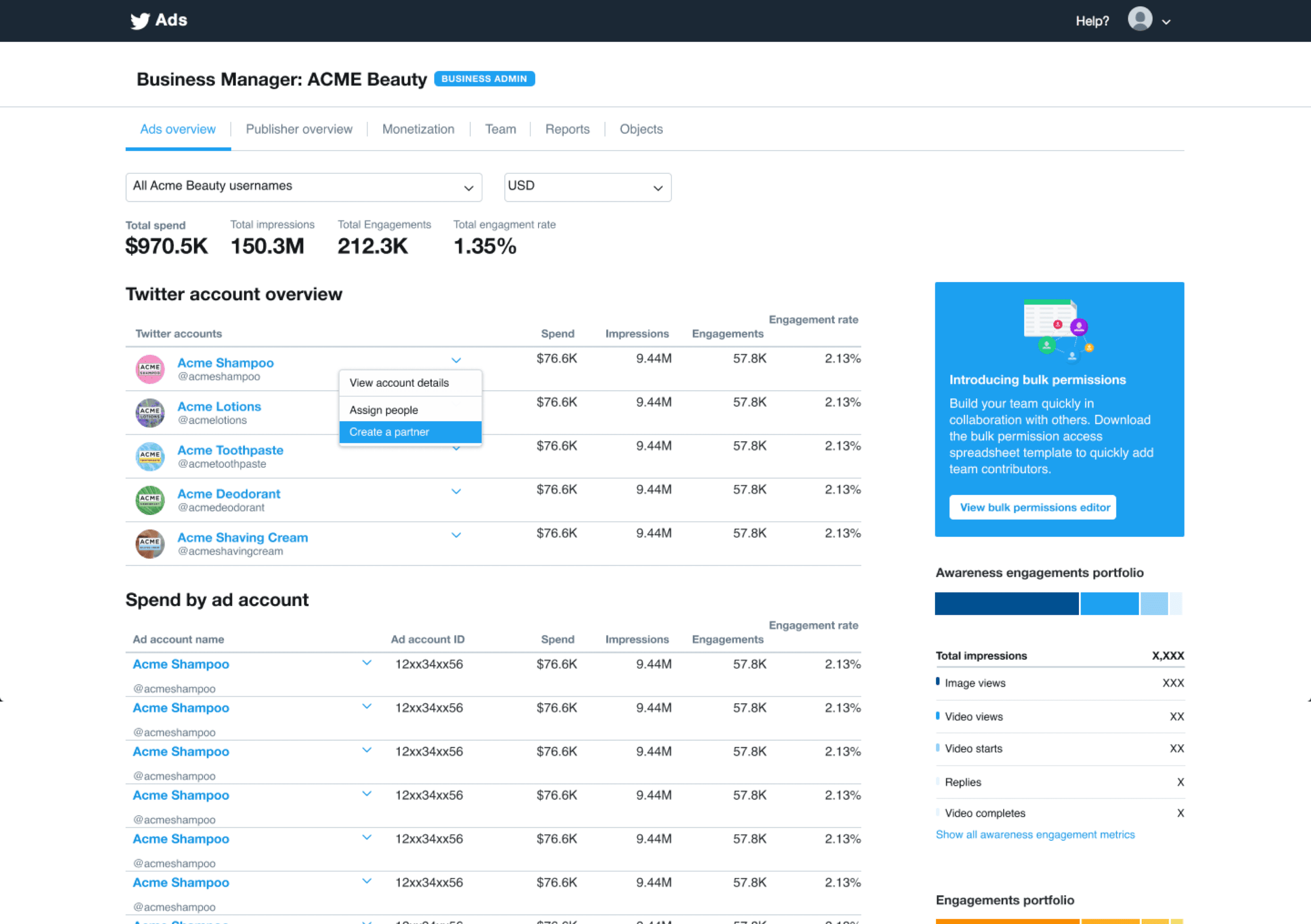
When I joined this project in 2018, Twitter had already started investing in a product called Twitter Business Manager. The premise was reasonable: build a centralized place for businesses to manage their presence on the platform. The execution was the issue. Through meeting with customers, reviewing the architecture, and mapping the data model against real advertiser workflows, I concluded that the solution was not going to meet their needs. It was cutting corners on the foundational data structure in ways that would create more problems than it solved. The relationships between businesses, people, accounts, and assets were being modeled too simply, and that simplicity was going to constrain everything built on top of it.
Through many relational diagrams, flow charts, and an interactive prototype built in React, I continually surfaced these concerns with partners across Product and Engineering. In 2018, I successfully advocated for senior leadership to pause the effort and reevaluate the solution. That's not a comfortable conversation to initiate as a Senior Product Designer. Telling people that the thing they've been building needs to stop is one of those moments where being right isn't nearly as important as being clear about why, and offering a path forward.
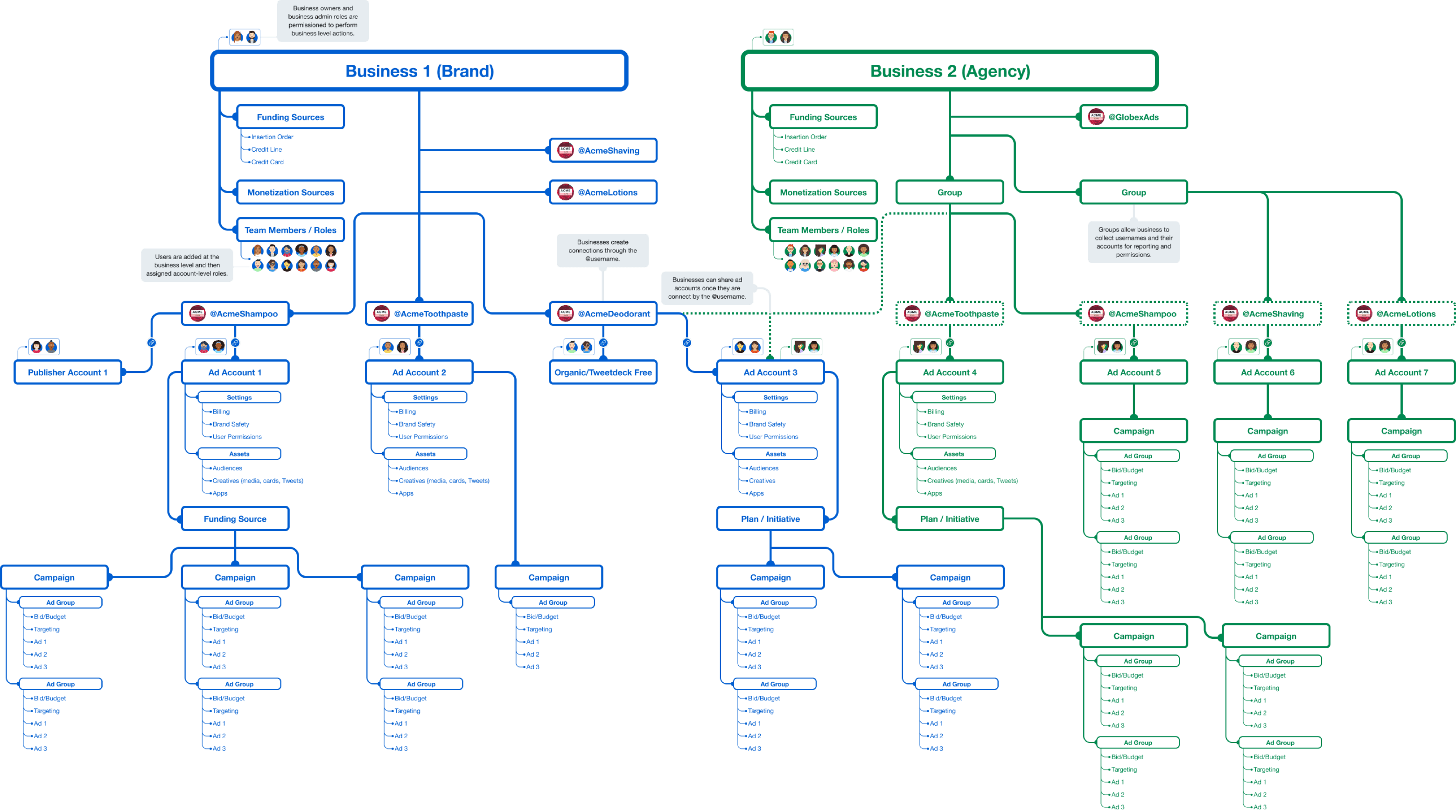
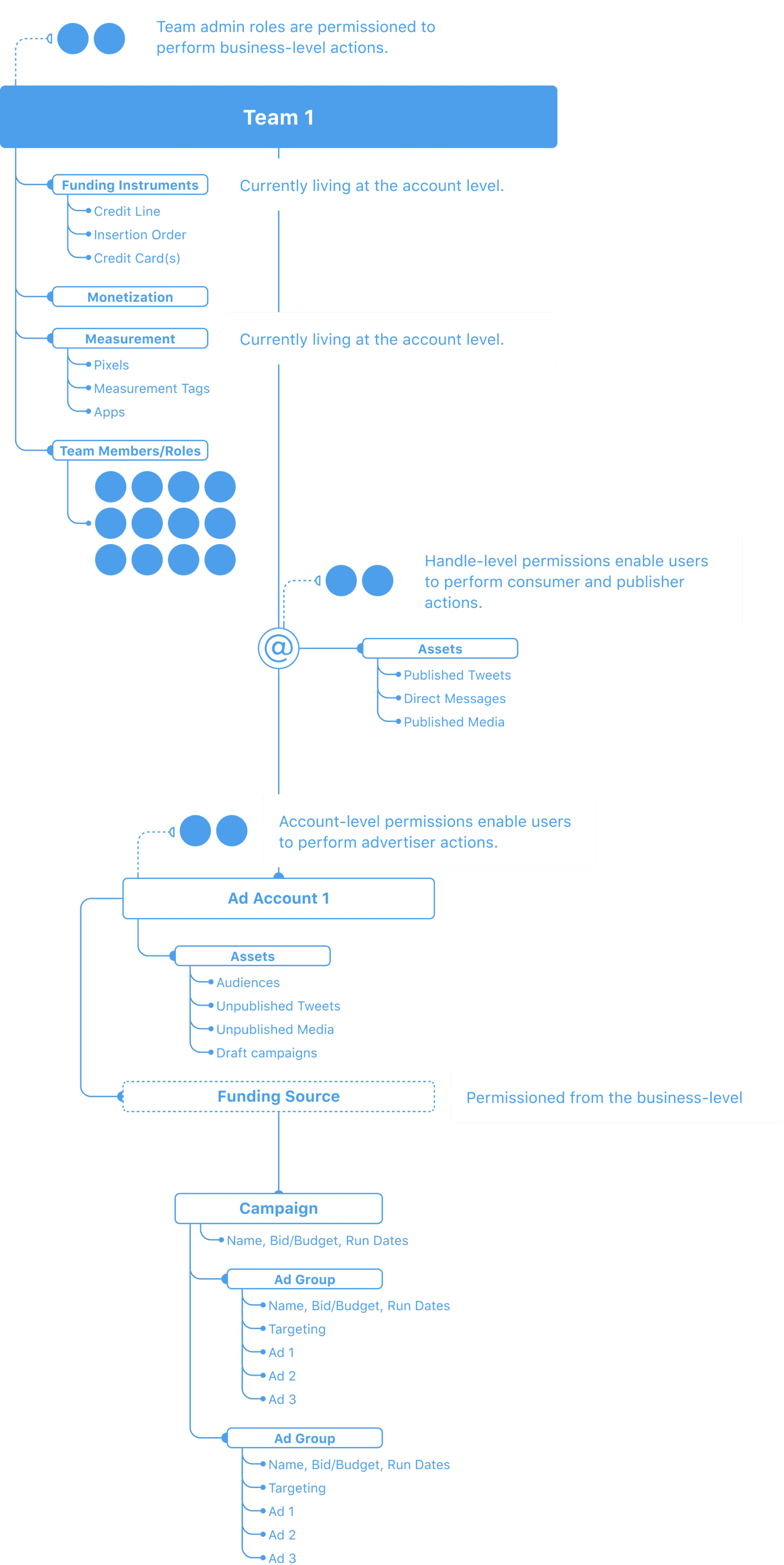
Starting over with the Right Foundation
In 2019, a small team was assembled to propose a new technical solution. The team consisted of one Staff Product Designer (me), one Product Manager, one Staff Engineer on the API side, and one Senior Engineer on the product side. Four people with a mandate to figure out the right data architecture for how businesses should work on Twitter.
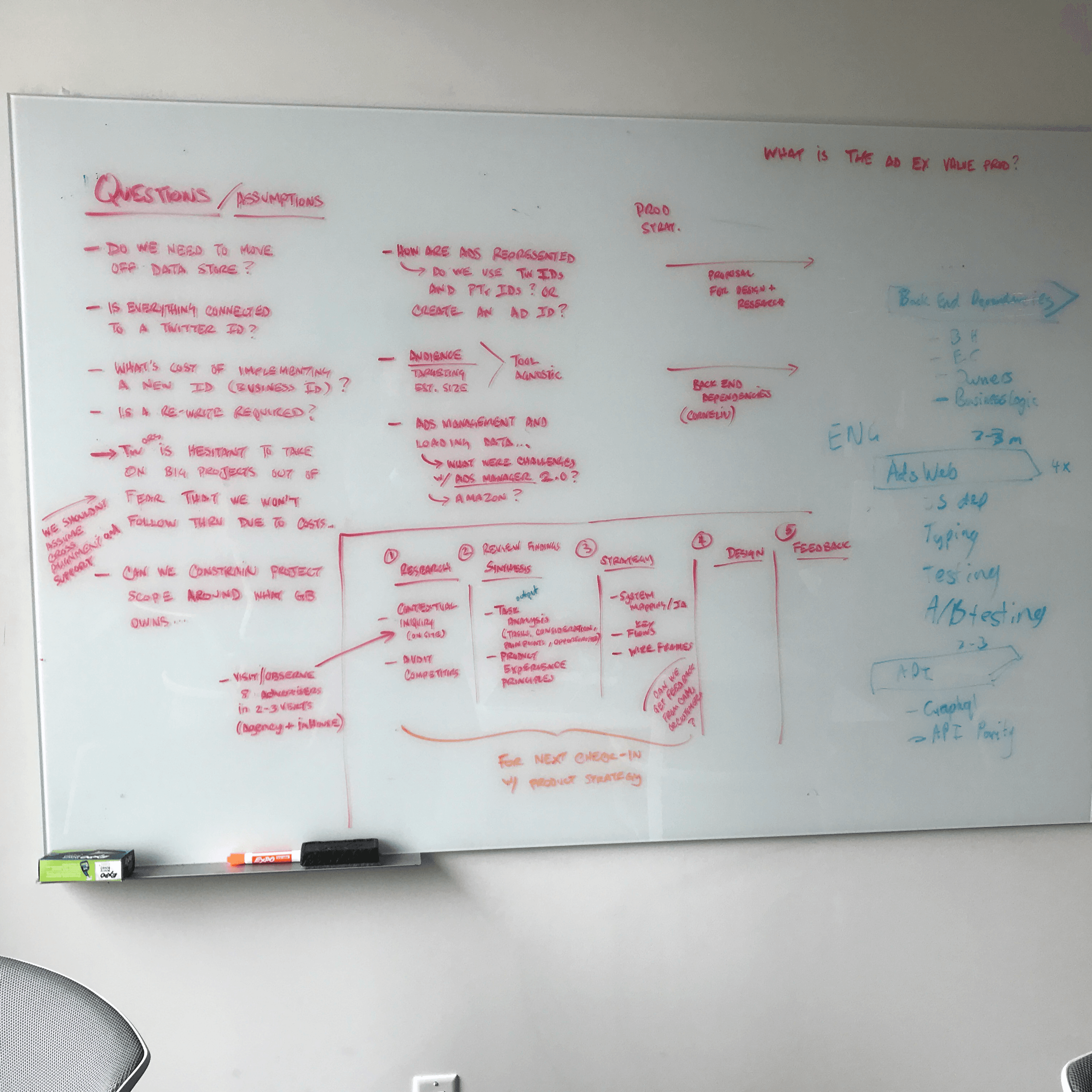
We spent time listening to the needs of customers, account managers, and internal teams across Ads, Publishers, TweetDeck, Developer Platform, and Celebrity partnerships. The primary goal was determining the data architecture required to meet customer needs and business goals, not designing a product surface. This was one of the rare projects where I spent more time with relational diagrams and permission matrices than with anything resembling a user interface.
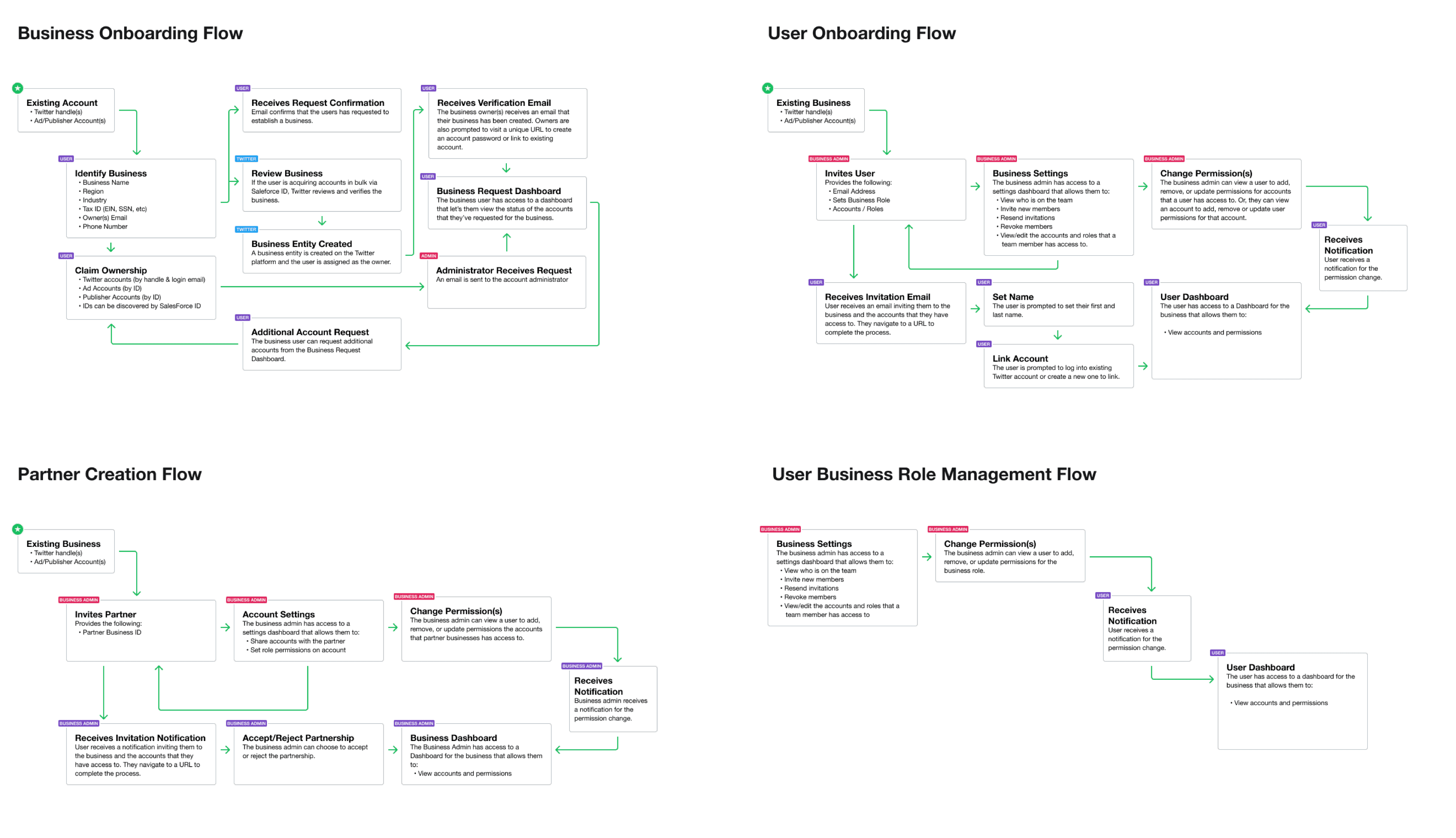
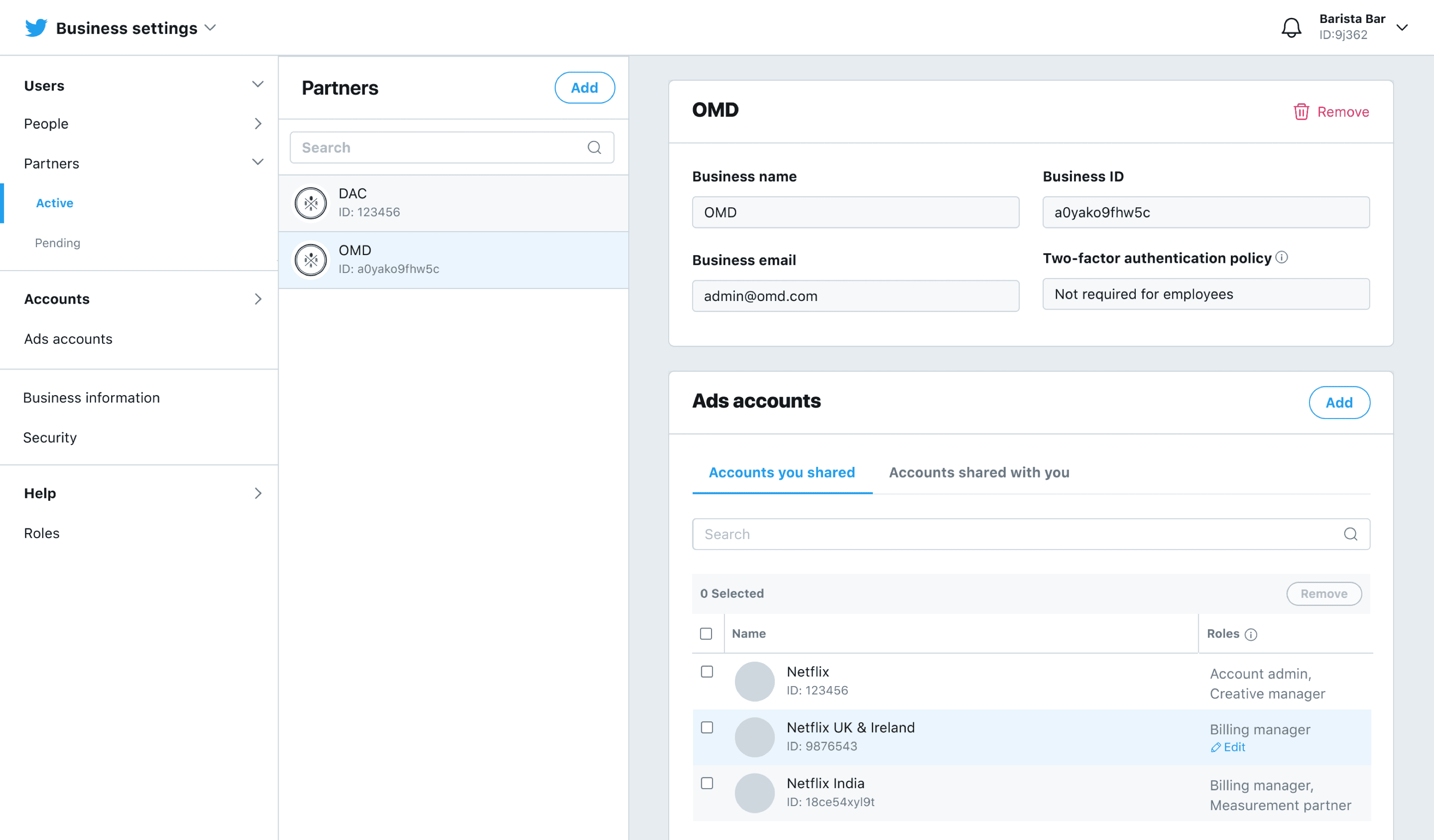
The solution was a graph permission model with the business at the highest level. An administrator would be created when setting up a business, with the ability to invite other administrators and employees. A Twitter account served as the "key" to getting access, but identity within the business was based on email and name, which allowed the system to handle the real-world reality that people change roles, leave companies, and join new ones. Accounts of all types (ads, organic, publisher, developer) could be added to a business, and people could be granted specific roles to access them. Businesses could also create partnerships with other companies to grant external access to accounts and objects, which solved the agency management problem (opens in new tab) that had been causing pain for years.
This wasn't a product surface. It was plumbing. And like good plumbing, the point was that everything built on top of it would work correctly because the foundation was right.
Building the Infrastructure, Then the Experience
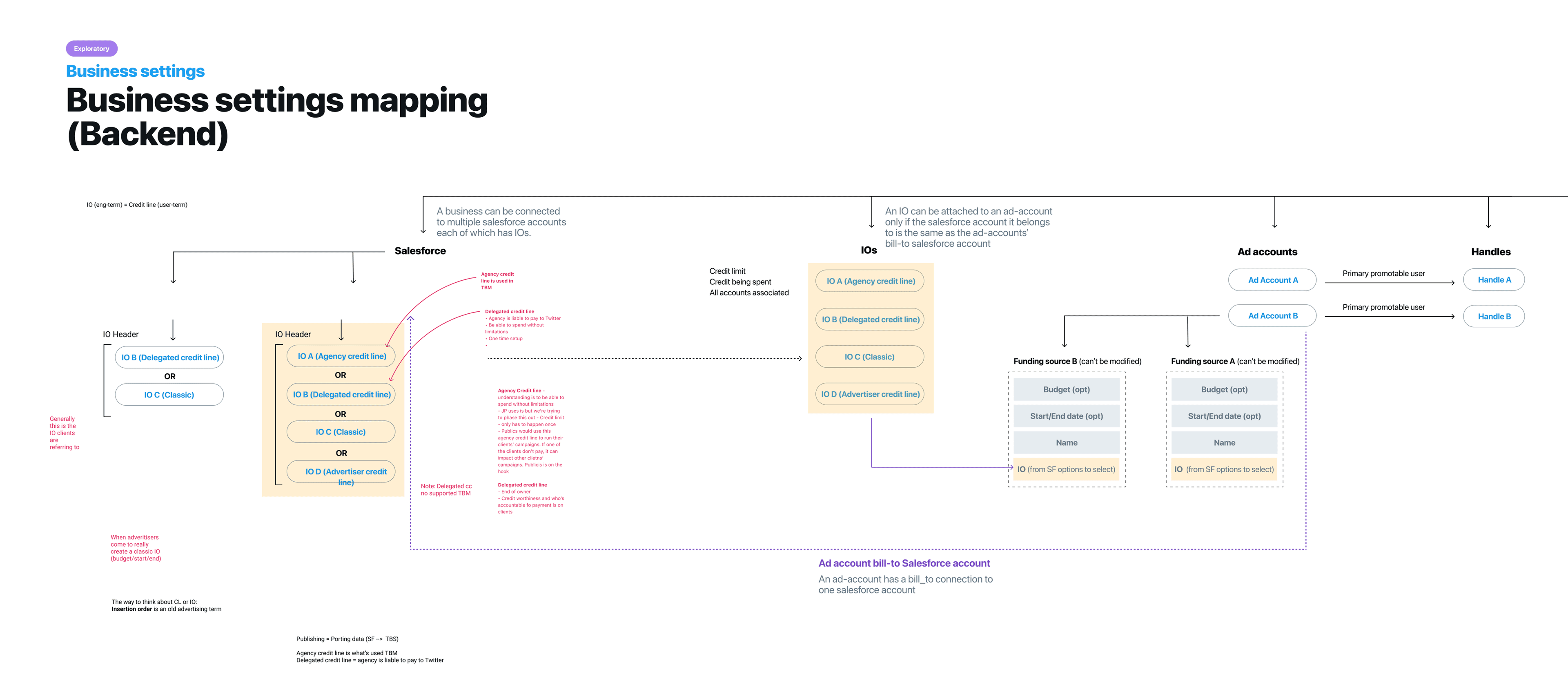
In 2020, a backend engineering team was assembled to build the new data structure. I had transitioned into a Product Design Manager role by this point, and I ramped a Senior Designer up on the project with a clear set of goals: visualize decisions for the cross-functional team, continue refining and validating core workflows with customers, determine the correct hierarchy for different business assets, and coordinate with the Design Systems team on necessary new components.
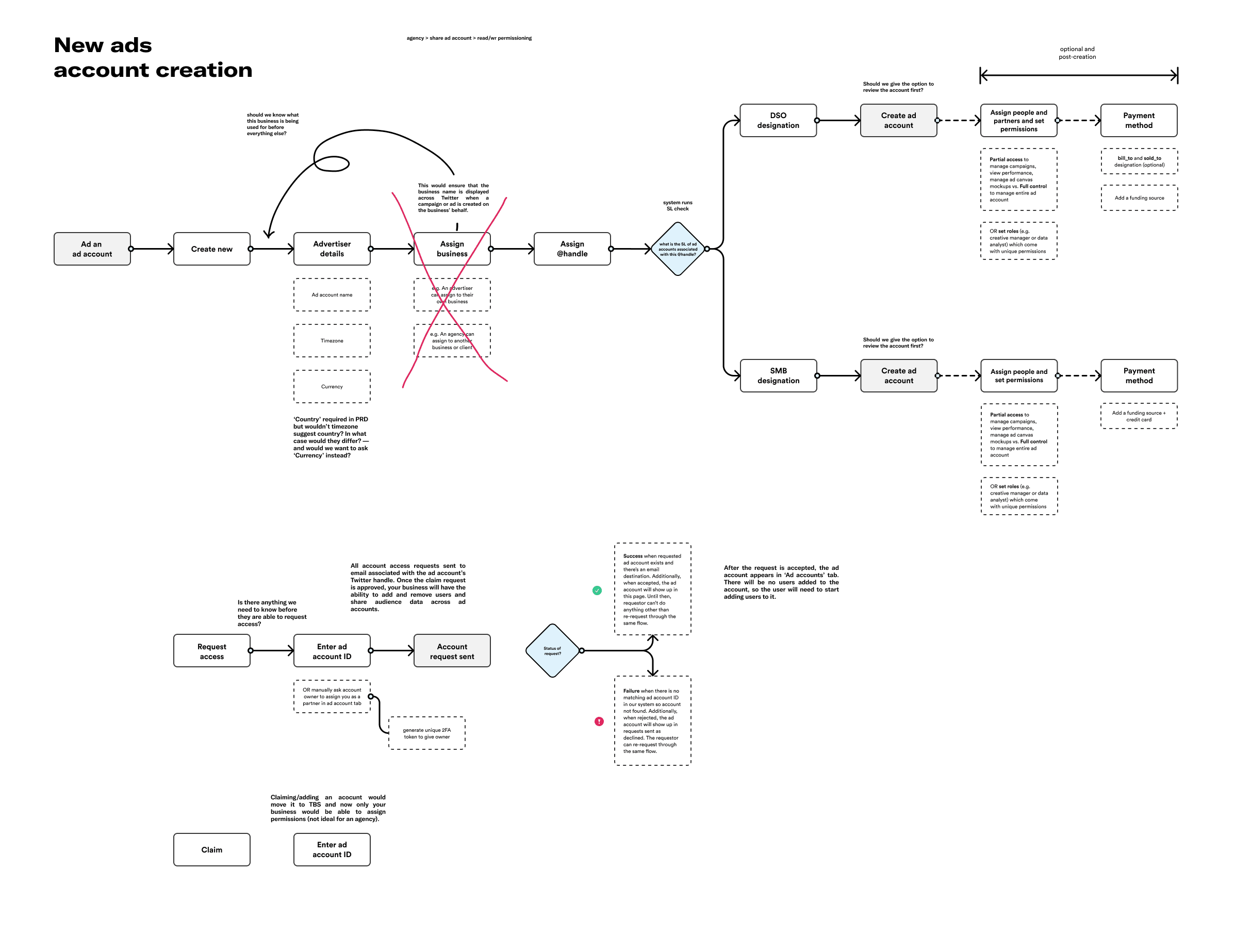
The design work during this phase was less about screens and more about systems. How should the relationship between a business and its ad accounts behave when an employee leaves? What happens when a partnership is dissolved? How do you communicate hierarchy and permissions in a way that doesn't require a training manual? Customer sessions and competitive analysis of peer platforms (including their API documentation, which often reveals how a system actually works better than the product surface does) informed these decisions continuously.
By 2021, the team was juggling Business Settings alongside several other major initiatives. The Advertiser Experience Vision project was running in parallel, and the strategic concepts coming out of that work reinforced why business infrastructure mattered: nearly every vision concept assumed that advertisers could manage their accounts, permissions, and assets through a coherent business layer. The vision work gave Business Settings additional urgency, and Business Settings gave the vision work a foundation to build on.
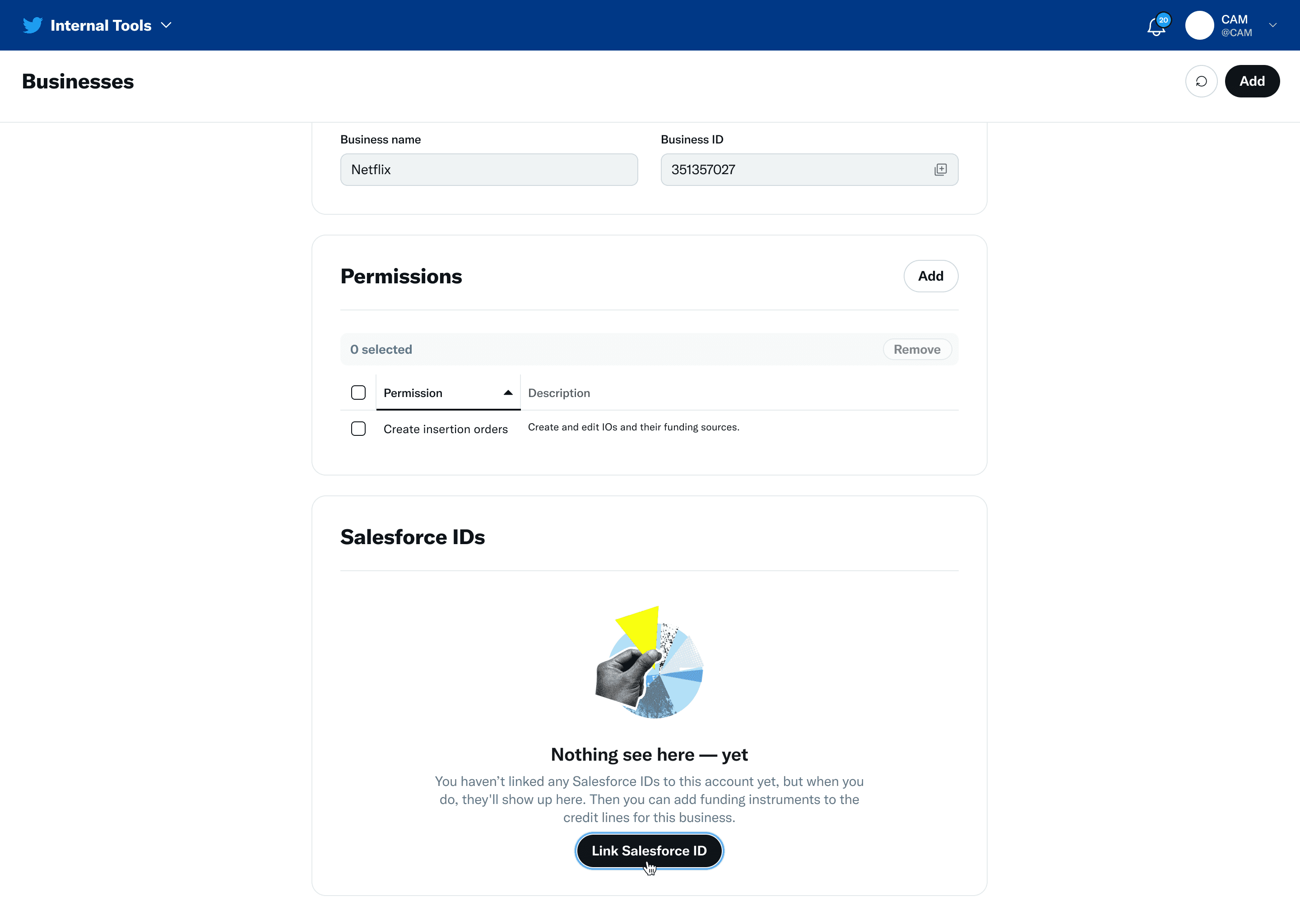
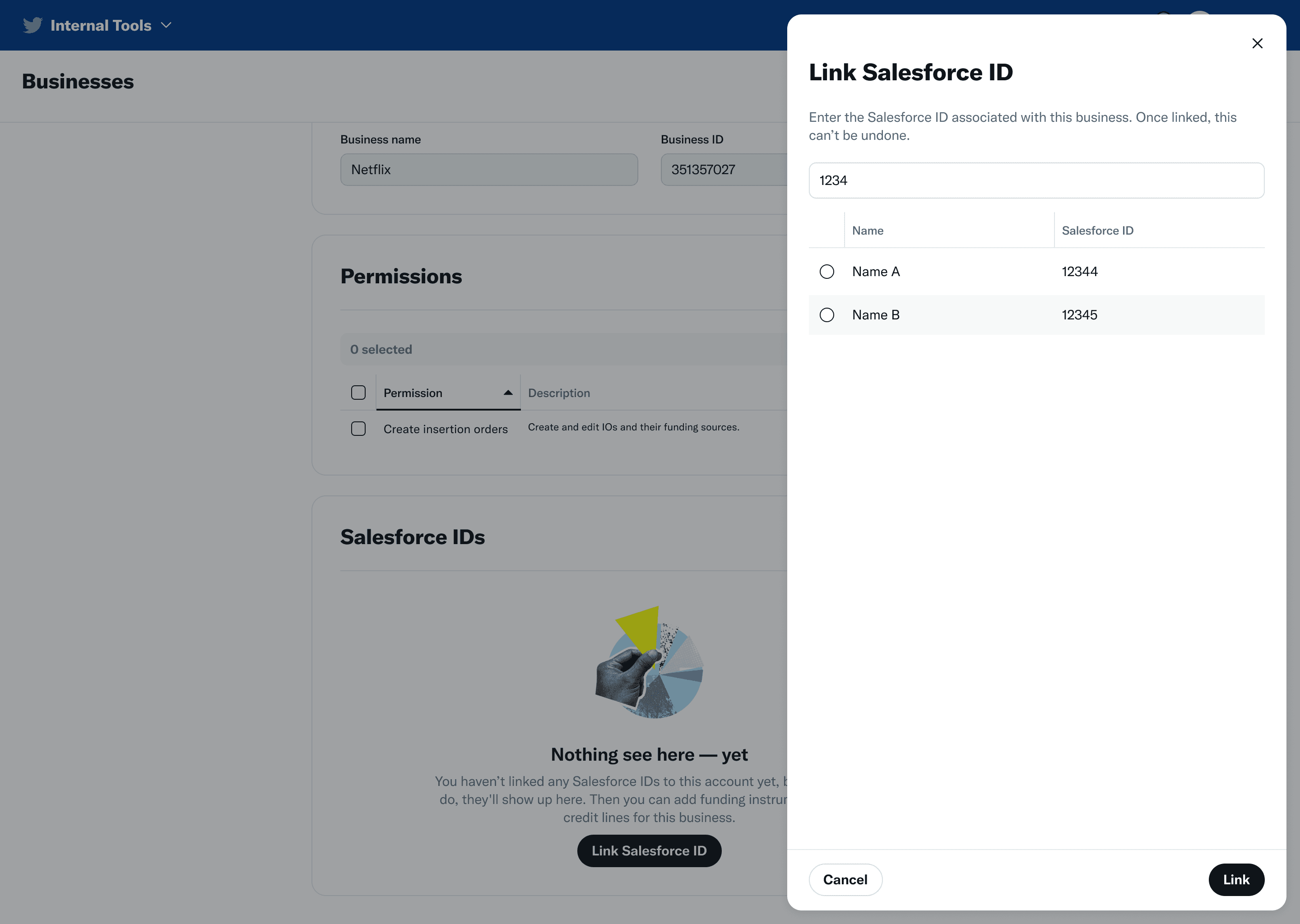
By 2022, the focus shifted to the customer experience. I coached a new Product Designer to lead the day-to-day design work and hired a manager report to oversee the effort directly, which allowed me to operate at a higher level across the broader advertising business. The product was called Business Settings, which had an underwhelming product name for its impact. It provided a surface for business customers, large and small, to manage permissions for the people, partners, accounts, and other assets that make up their business.
The timing mattered. Twitter expanded Professional Accounts to all users globally in March 2022 (opens in new tab), creating a new category of account that businesses needed to manage alongside their ads accounts, organic accounts, and partner relationships. Business Settings was designed to accommodate this growing ecosystem from the start, because the graph model was built to be extensible rather than tied to a single account type.
What We Shipped
Business Settings launched in Q2 2022, with a goal to rapidly scale adoption across Twitter's advertiser base.
Professional account permissions allowed businesses to grant specific roles to people and partners, giving them the ability to act on behalf of professional accounts with the right level of access. This replaced the credential-sharing behavior that had been the norm for years.
Onboarding workflows stitched together invitation and account-linking flows to reduce the friction of initial setup. Instead of asking businesses to configure everything from scratch, the experience guided them through connecting the assets they already had on the platform. This was especially important for the SMB segment. As the Simple Ads effort was lowering the barrier to creating campaigns, Business Settings needed to make sure the business infrastructure didn't become the new bottleneck for newer advertisers trying to get started.
Bulk account claiming recognized that large advertisers already had many accounts linked to their professional profiles. Rather than making them add each one individually, we created workflows that used existing relationships to accelerate adoption. For an agency managing 40 client accounts, the difference between linking them one by one and claiming them in bulk was the difference between a morning's work and a week's worth of support tickets.
Professional Notifications
The new business architecture also made something possible that had been a gap since Twitter first started building professional products: routing notifications to the correct person.
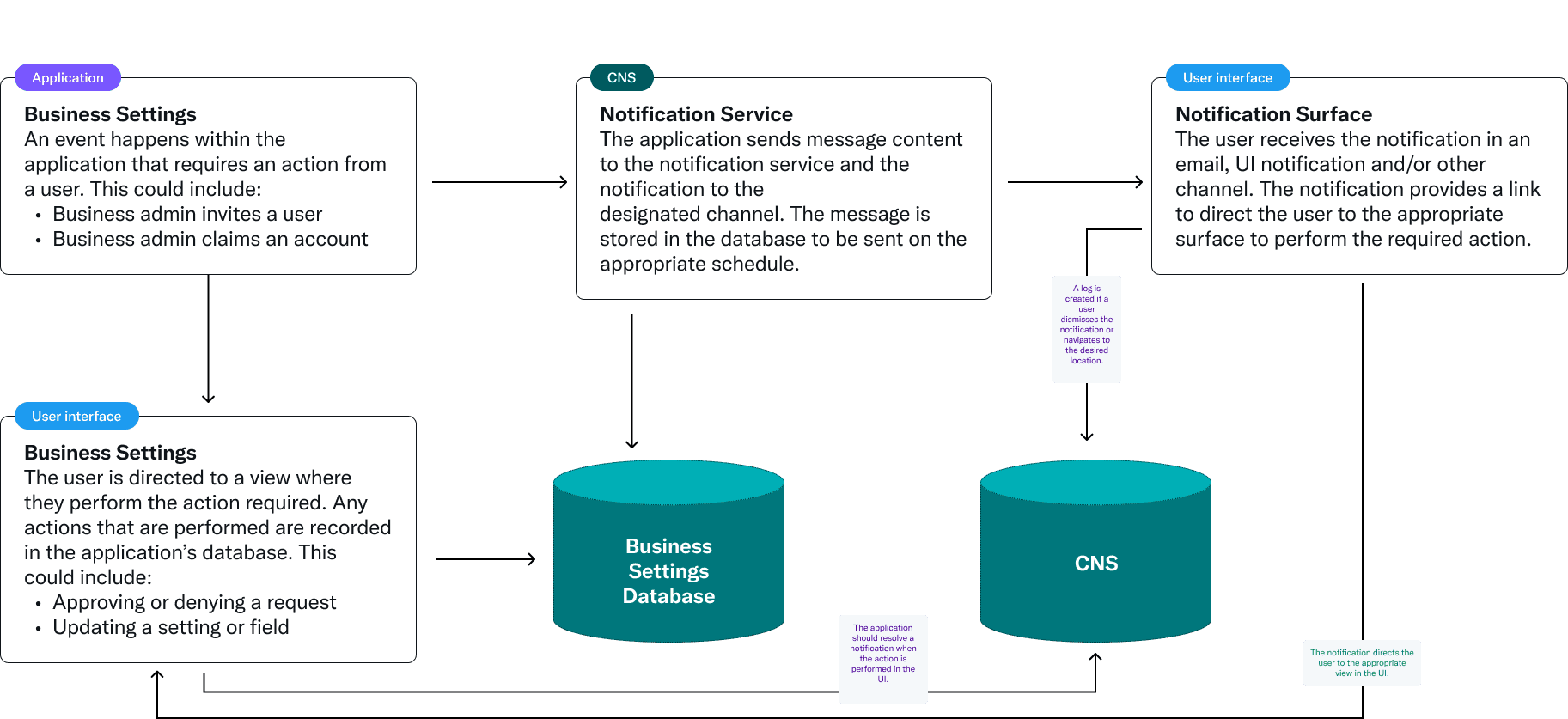
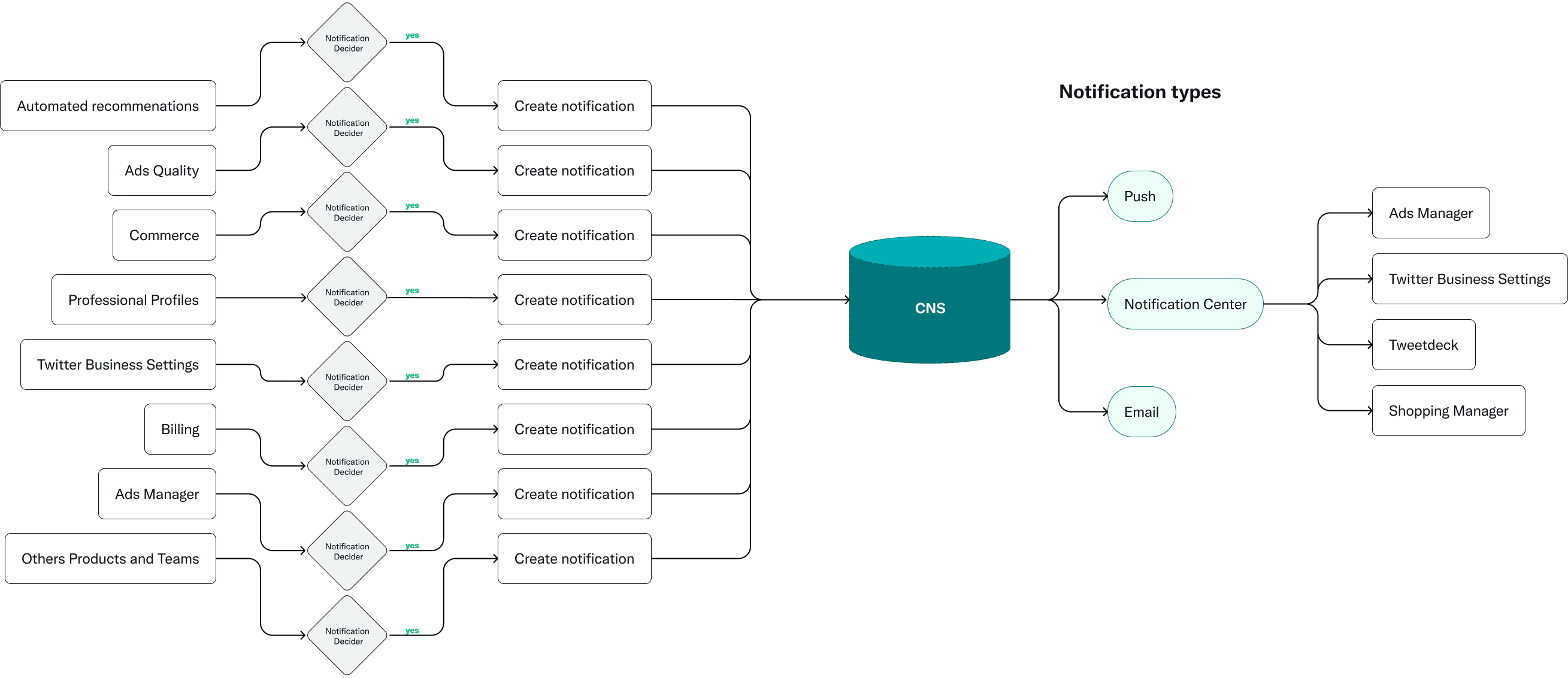
Before this, notifications from professional tools (ads performance alerts, billing reminders, campaign approval requests, measurement issues) had no reliable way to reach the right person within a business. If three people managed the same ad account, all three got every alert, or worse, none of them did. There was no concept of "this person handles billing" or "this person approves campaigns" at the notification level, because the underlying data model had no way to express those relationships.
The graph permission model changed that. Because people now had defined roles within a business, and those roles carried specific permissions relative to accounts and objects, the system could determine who should receive which notifications. The team I led designed and launched the initial version of professional notifications in 2022, routing alerts based on permissions and roles within the business hierarchy. It sounds like a feature that should have existed from the beginning, and that's kind of the point. It couldn't exist until the architecture supported it.
This became particularly relevant as Dynamic Product Ads launched and advertisers needed to coordinate across catalog management, campaign setup, and measurement. When a product catalog sync failed or a measurement pixel stopped firing, the person responsible for that part of the business was the one who needed to know, not everyone on the account.
The Business Management work also surfaced a broader navigation problem that had been compounding for years. I led the effort to address that through a separate Global Navigation initiative.
Results
By the end of 2022, Business Settings had reached meaningful adoption:
What Five Years Taught Me
This project spanned nearly my entire management career at Twitter, from Senior Designer through a promotion to Senior Manager. The lessons are less about any single design decision and more about what happens when you sustain conviction over a long period.
Sometimes the Most Important Design Decision Is Stopping
Convincing leadership to pause Twitter Business Manager in 2018 was the highest-leverage thing I did on this project. Everything that followed depended on getting the foundation right, and the original approach wasn't going to get there. Being willing to flag that, build the case for it, and offer an alternative direction is part of the job, even when it's uncomfortable. Especially when it's uncomfortable.
Architecture Is a Design Problem
The graph permission model wasn't a product surface. The mockups and prototypes didn't tell the full story in a design review. But the decisions about how businesses, people, accounts, and partnerships related to each other determined what every future product experience could and couldn't do. Professional notifications only became possible because the data model was designed to support them, even though notifications weren't in the original scope. Designers who only think in terms of interfaces miss the opportunity to shape the systems underneath them.
Long Projects Require Evolving Your Role
In 2018, I was building React prototypes and drawing relational diagrams. By 2022, I was coaching a designer two levels below me while overseeing the effort through a manager report. The project required me to grow from hands-on IC problem-solving to organizational leadership, and the fact that I'd been involved since the beginning meant I could provide context that nobody else on the team had. That continuity mattered for the quality of the decisions being made at every stage.
Design-Led Doesn't Mean Design-Only
The initial architecture work, the push to pause the original initiative, the professional notifications system: these were all design-led efforts. But they succeeded because we built trust with Engineering and Product partners through transparency and shared ownership. Leading doesn't mean doing it alone. It means being the one willing to do the work required to make the case, and then bringing everyone along.